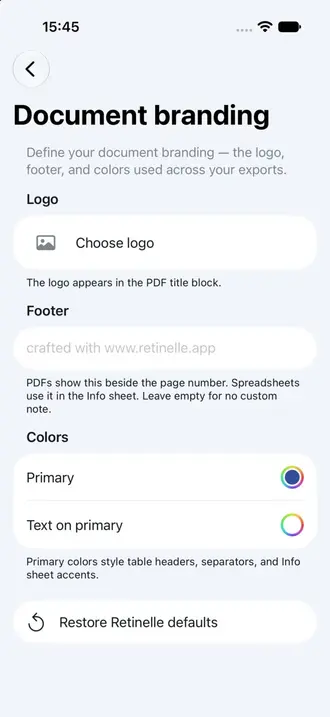
Document Branding gives exported Retinelle documents a consistent identity. Add a logo, choose document colors, and define footer content once, then reuse those settings whenever you prepare an inventory for a client, insurer, tenant, or family member.
What you can customize
Set the visual details used across your exports:
- Logo. Add the organization, business, or project mark that appears in the PDF title block.
- Colors. Choose primary colors that style export headers, separators, and spreadsheet Info-sheet accents.
- Footer text. PDFs show it beside the page number; spreadsheets use it in the Info sheet. Leave it empty when you do not need a custom note.
Choose the branding source for each inventory: shared branding for all inventories, a custom version for this inventory, or Retinelle’s defaults. Shared branding keeps recurring exports consistent, while an inventory-specific version lets you prepare a one-off client or project document without changing the global setup.
A practical branding workflow
- Add the logo, colors, and footer text you want to reuse.
- Choose shared branding for recurring documents or override it for one inventory.
- Preview the export and check logo contrast, footer length, and the fields included for the recipient.
- Generate the final PDF or spreadsheet and review it before sharing.
Branding changes the presentation of an export, not the underlying inventory. It does not certify the contents, verify item values, or replace any document format required by an insurer, client, or public authority.
A clearer handoff
Branding helps recipients understand where a document came from. A contractor can send a parts report carrying business contact details. A property manager can produce consistent move-in inventories. A club can add its identity to equipment records shared with volunteers.
The underlying inventory stays flexible: filter and sort a project for the current audience, select the fields to include, and then apply the same recognizable presentation.
Branding and backups
Document-branding settings can be included when restoring a Retinelle backup. During restore, you choose whether archived app-level settings such as the logo, footer, and colors replace those currently on the device.
Part of Retinelle Plus
Document Branding is a Retinelle Plus feature. PDF export remains available for free; Plus adds the ability to adapt exported documents to your own visual identity.
Related features
- Export Your Inventory to PDF to create a shareable branded report
- Export to Spreadsheet for structured, editable data
- Backup and Restore Your Inventory to protect projects and branding settings
- All features