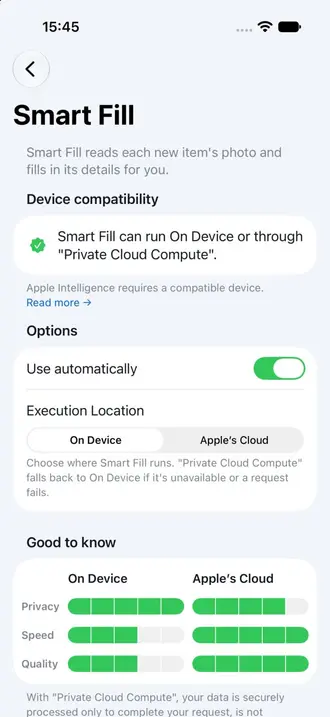
Smart Fill turns a new item’s photos into a useful first draft. Instead of typing every detail from scratch, let Retinelle suggest a title, description, and values for the custom fields you select, then review the result before continuing.
What Smart Fill can complete
Smart Fill reads the visible object and context in each new item’s photos. It can fill the item’s title and description, along with enabled custom fields such as category, condition, brand, color, or room. You decide which details it is allowed to fill and can edit every suggestion.
This is especially useful when capturing many items in one session. Photograph each object, let Smart Fill prepare the repetitive details, and spend your time checking the information that matters.
Automatic or manual
Enable automatic filling to run Smart Fill as you add photographed items. If you prefer more control, leave automation off and run it manually for individual items. Items without photos remain available for normal manual entry.
Device and language requirements
Smart Fill is a Retinelle Plus feature and requires iOS 27 or later, Apple Intelligence, and a compatible device, region, and language. Apple Intelligence may still be preparing after setup, and availability can vary by device model or region.
Smart Fill uses on-device AI by default. If you opt in to Private Cloud Compute in Smart Fill settings, the photos and item details needed for that request may be sent to Apple’s service so a larger model can process them. Apple states that the request data is used only to fulfill the request, is not accessible to Apple, and is not retained after the response is returned. Read Apple’s Private Cloud Compute Security Guide for the technical details.
If Private Cloud Compute is unavailable or a request fails, Smart Fill falls back to on-device processing when your device supports it.
Changing the execution setting affects future Smart Fill requests. It does not upload the rest of your inventory, and Smart Fill remains optional even with a Retinelle Plus subscription.
Review remains important
Photo interpretation is a starting point, not a guaranteed record. Check serial numbers, prices, warranty dates, and other exact details before relying on them in an export. Custom-field results can vary, particularly for details that are not clearly visible in the photo.
Related features
- Add Custom Fields to Your Inventory to choose the structured details Smart Fill can complete
- Capture Multiple Photos to give each item useful visual context
- Edit Multiple Items at Once to manage a large capture session
- All features