
Most people only think about a home inventory for insurance after something goes wrong. By then, trying to remember every item you owned, what it cost, and when you bought it becomes an exercise in guesswork. The better approach is to document your belongings now, while everything is in front of you, so the record is already there if you ever need to file a claim.
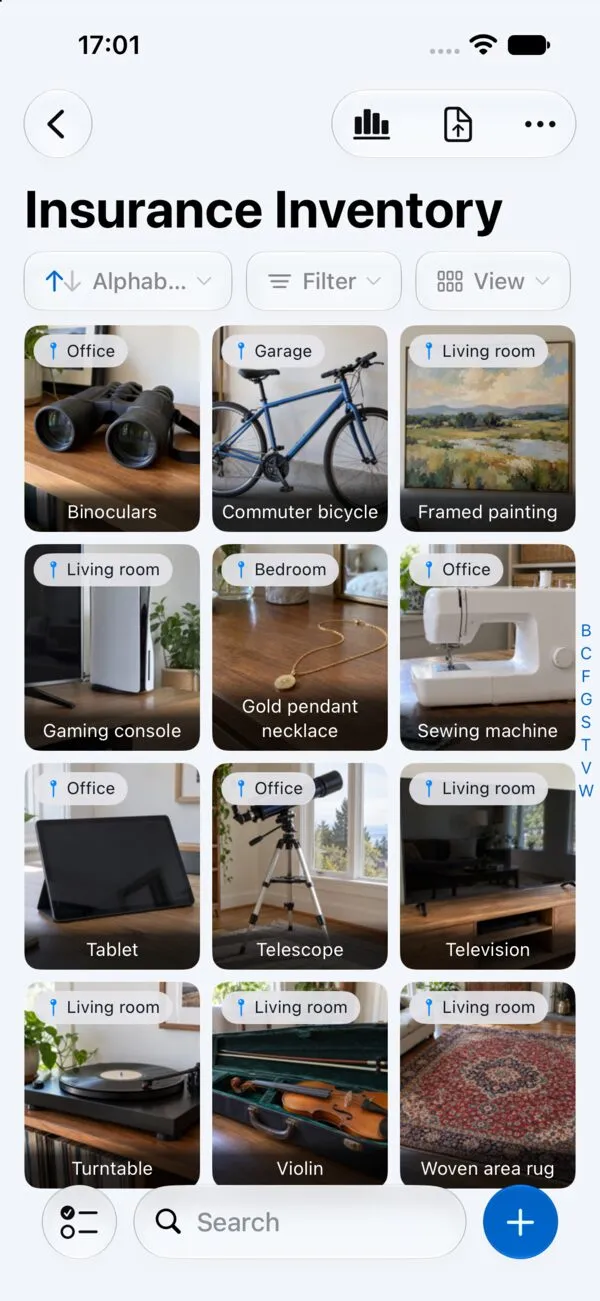
Retinelle makes this straightforward. You photograph items, add the details that matter for insurance purposes, and organize everything by room or category. When the time comes, you export a dated PDF and hand it to your insurer.
How to build a claim-ready home inventory
-
Walk through each room and photograph every item worth documenting. You do not need to capture every fork in the kitchen drawer, but anything you would want to replace after a loss should be in your inventory. Open closets, drawers, and cabinets — those hidden items are the ones most often forgotten during claims.
-
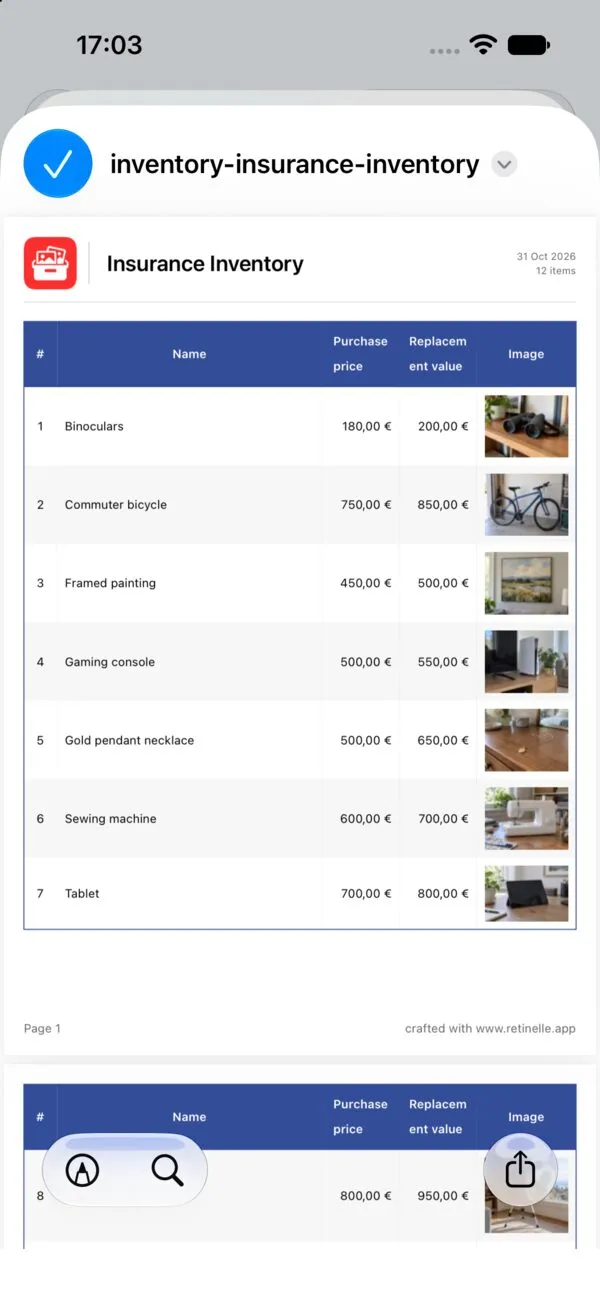
Add structured details to each entry. Use the notes and fields in Retinelle to record purchase price, estimated replacement value, brand, model, and serial number where applicable. This level of detail is what separates a useful inventory from a photo album. It gives an adjuster concrete information to review, although insurer requirements and claim outcomes vary by policy and location.
-
Organize items into projects by room or category. Group entries like “Living Room,” “Garage,” or “Electronics” so you can update a single area without scrolling through hundreds of items. This also makes the exported report easier for an adjuster to navigate.
-
Export a clean PDF and store it outside your home. Generate a dated report from Retinelle and keep a copy somewhere that would survive the same event as a loss — email it to yourself, save it to a cloud drive, or hand a copy to your insurance agent. The point is redundancy: your inventory should not be destroyed by the same fire or flood it was meant to document. Ready.gov recommends the same practice — keeping property records outside the home, whether with a trusted contact or in secure cloud storage.

What to record for each item in an insurance claim inventory
Not every item needs the same depth of documentation. Here is a practical breakdown of what to record depending on the item type:
- High-value items (electronics, jewelry, art, instruments): multiple photos from different angles, brand, model number, serial number, purchase date, purchase price, receipt or proof of purchase if available, and appraised or estimated replacement value.
- Furniture and appliances: one or two clear photos, brand and model, approximate purchase date, and estimated replacement cost. Condition notes help if items are relatively new.
- Clothing and everyday goods: a wide-angle photo of the closet or drawer contents is usually sufficient, paired with a rough count and estimated total value for the group. Individual documentation is only worth the effort for high-end pieces.
- Collections (books, records, tools, sporting gear): photograph the full collection plus close-ups of any standout pieces. Note the approximate number of items and total estimated value.
Retinelle’s custom fields make this practical. You can create a currency field for “Replacement Value,” an enum for “Condition” (Excellent, Good, Fair, Poor), and a text field for “Serial Number.” Because these fields are typed and structured, you can filter your item list — showing only high-value items, for example — and sort your exported PDF or spreadsheet by replacement value. That means you can hand your insurer a report organized by room with a total value per section, not just a flat photo dump.
Why a photo-based home inventory supports insurance claims
Insurance adjusters are evaluating whether your claim is accurate and complete. A well-organized, photo-backed inventory can reduce ambiguity. Instead of saying “I had a TV in the living room,” you can show a photo of the exact model with the serial number recorded beside it. That specificity can make the file easier to review, but it does not guarantee approval speed, payment amount, or a particular settlement. The Texas Department of Insurance warns that not having a home inventory can delay your claims payment — regulators point to the same documentation habits described here.
A PDF export also gives you a dated snapshot. If your policy requires proof of ownership or condition at a certain point in time, a timestamped report can be more useful than a verbal list written from memory weeks after a loss.
Mistakes that weaken insurance claims
- Only photographing rooms from the doorway. Wide shots are useful for context, but adjusters need to see individual items. Get close enough that brand names and model details are legible.
- Skipping items in storage areas. Basements, attics, sheds, and garages often hold thousands of dollars in tools, seasonal gear, and equipment that people forget to document.
- Recording purchase price but not replacement cost. What you paid five years ago may be very different from what it costs to replace today. Include both when possible, and check whether your policy uses replacement-cost or actual-cash-value coverage.
- Creating the inventory once and never updating it. A home inventory is only useful if it reflects what you actually own. Set a reminder to update it periodically and after any significant purchase.
Insurance home inventory questions
How often should I update my home inventory?
A full review once a year is a reasonable baseline. Beyond that, update your inventory whenever you make a major purchase, receive a gift of significant value, or complete a renovation. The goal is to keep the record close enough to reality that it would hold up if you needed it tomorrow.
Do I need receipts for every item in my inventory?
Requirements vary by insurer, policy, item, and jurisdiction. Receipts may strengthen a claim, while photos, brand and model details, serial numbers, statements, or appraisals may provide additional support. Record receipts when you have them, but do not postpone documenting an item because a receipt is missing. Ask your insurer which evidence it accepts.
How do I submit my inventory to an insurer?
Export a PDF from Retinelle and email it to your agent or upload it through your insurer’s portal. Some people also keep a printed copy in a safe deposit box. The key is that the document exists outside your home and is accessible when you need it.